• 'Getting started' kitchen appliance instructions

    TASSIMO COFFEE MAKER

    1. Fill / top up water tank as needed

    2. Turn it on at the bottom

    3. If nothing happens, press the Start/Stop button (the big one shaped like a teardrop slightly on its side, underneath where it says Bosch) – a red light will flash and stop when the machine is ready.

    4. Lift open the brewing unit lid

    5. Insert a T-Disc (barcode side down, with tab aligned).

    6. Close the lid—listen for a click.

    7. The machine reads the barcode and apparently, it then automatically sets “brewing parameters”, whatever they might be.

    8. Coffee should start appearing

    9. When your coffee is ready, please remove the used T-Disc and throw it in the bin.

    10. If you want a longer/shorter coffee: during dispensing, press the Start/Stop button to stop, or hold it for a longer drink.


    DISHWASHER

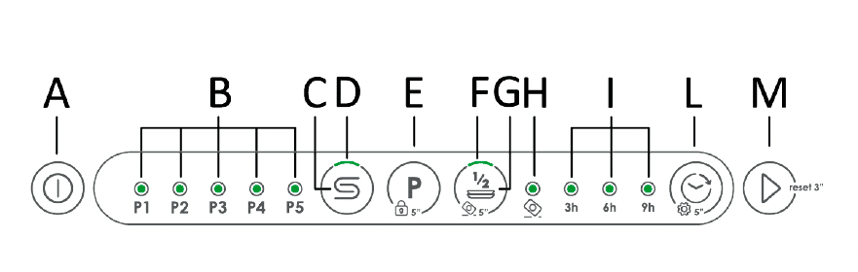
    Press Power button on the left (Button A)

    Choose your program by using the P button – press repeatedly until the programme you want lights up

    Press Start (Button M).

    If you open the door to put something extra in, you’ll need to press Start again – the dishwasher will take a few seconds to think about this.

    Warning – if you press and hold the Programme button, the child-lock will turn on. It took us ages to work out what had happened when we first did it! Just press and hold for five seconds again, to turn child-lock off.
  • WASHER/DRYER

    Turn the controller knob to the programme you want, and press Start.

    The tumble drying programmes have a star icon next to them.

    To make the dryer start automatically after the wash, select your wash programme with the knob, then press the 'Drying' button on the black digital panel, then press Start

    MICROWAVE

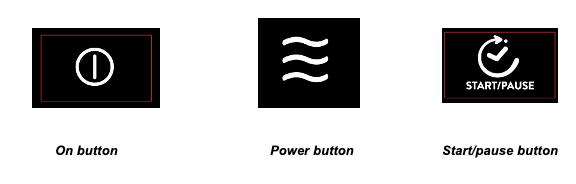
    On button Power button Start/pause button

    Easy

    · Press the On button (at the bottom left of the panel). "01:00" will blink in the display and the microwave icon will appear.

    · Use the silver + / - knob on the right to choose length of time (the default is one minute)

    · Press the Start/Pause button.

    Advanced use! Setting to cook at a chosen power, for a chosen time

    · Press the On button

    · Turn the +/- knob to set the time (eg 12 mins to defrost a pint of milk)

    · Press the Power button to adjust the power

    · Turn the + / - knob to set the power (eg 300 to defrost a pint of milk)

    · Press the Start/Pause button

  • OVEN

    Choose your oven setting:

    o Fan oven: bottom right symbol - a fan symbol with a line above and below.

    o Conventional: symbol is top and bottom of a box with a dot in the middle.

    o Grill: symbol is wavy line with dot under it. Use the grill with the door closed.

    Choose your temperature using the + and - on the digital panel. The degree symbol will flash until the oven is at the right temperature. At this point the oven will also beep.

    HOB

    Touch the on/off button

    Put your pan on the section you are using. On the slider that corresponds with the section touch the slider and move your finger along until you get to the desired temperature.

    When you have finished, slide the slider back to the left to zero and then hold until the dash is showing.

    Turn the power button off.